With the August Update, PUBG: Playgrounds is arriving as a new home where even more players can discover and enjoy community-created modes together.
Developer’s Comment
Until now, players have been able to create their own modes through the UGC Alpha feature in Custom Match. However, playing those creations with others required creators to gather people themselves and invite them to a Custom Match, making it difficult for their modes to reach a broader audience.
It was also difficult to browse modes created by other players, which made community-created content less accessible overall.
With this update, the feature is being expanded into PUBG: Playgrounds. Popular and entertaining player-created modes will be selected and featured on a dedicated page, where players can jump straight into them through matchmaking. Our goal is to make PUBG: Playgrounds easier to access and use, while giving creators even more motivation to build great modes.
The modes available through PUBG: Playgrounds will be updated monthly. We plan to source modes through a variety of channels and continue introducing new creations with each update.
■ Information for Mode Creators
How Modes Are Added to PUBG: Playgrounds
Direct mode submissions are not currently supported. Instead, the developers will select modes based on gameplay data collected from Custom Matches.
We will provide a separate announcement should the submission or registration process change in the future.
Play your mode in Custom Match — The more often your mode is played in Custom Match, the more gameplay data it will accumulate.
Developer review and selection — The developers will monitor a range of gameplay data, including total playtime and average participation rate, to identify popular modes.
Addition to PUBG: Playgrounds — Modes that meet the required criteria based on monitoring results will be added to the PUBG: Playgrounds, allowing them to reach more players through matchmaking.
In addition to selection based on gameplay data, modes may also be sourced and added through other channels, including community-created mode contests.
Mode Selection Restrictions
Even popular modes may be excluded from PUBG: Playgrounds if any of the following conditions apply.
Grounds for exclusion from PUBG: Playgrounds:
The map itself contains content that violates the Rules of Conduct or the PUBG: BATTLEGROUNDS Mods Policy.
The mode contains a critical bug that prevents normal gameplay.
The mode contains inappropriate text.
A mode may remain available after the relevant content is removed from its description if the description contains:
Links or website addresses used for commercial purposes, including advertising, sponsorships, or promotions.
Links to personal social media accounts or personal websites.
Information about a clan that the creator belongs to or operates.
Any other content that violates the Rules of Conduct or the PUBG: BATTLEGROUNDS Mods Policy.
Things to Keep in Mind When Creating a Mode
Custom Match (Create) is available only to BATTLEGROUNDS PLUS accounts.
If no separate thumbnail is registered, an in-mode screenshot will automatically be used as the mode’s thumbnail.
Setting appropriate primary and secondary tags will help more players discover your mode.
If a community-created mode is selected and added to PUBG: Playgrounds, certain settings, such as the score limit or number of rounds, may be adjusted to ensure stable gameplay.
Policies and Support
The PUBG: BATTLEGROUNDS Mods Policy can be found under the Mods Policy tab at the link below.
For questions related to modes, please contact PUBG Support.
Any future changes to the PUBG: Playgrounds policy will be announced separately.
■ Information for Mode Players
(PC) PUBG: Playgrounds
The upcoming August Update will introduce PUBG: Playgrounds, a dedicated hub for community-created modes.
You can access it through [PUBG: Playgrounds] under the [Play] menu.
Browse the available modes at a glance, select the one you want, and start matchmaking right away.
PUBG: Playgrounds will be available on PC.
Page Overview
Main Page
When you enter the PUBG: Playgrounds menu, the main page will display a list of all currently available modes.
You can view each mode’s name, primary tag, and thumbnail. Hovering over the information icon will display the following details:
Mode name / Creator name
Primary and secondary tags
Maximum number of players / Maximum team size
Page sections
New: Displays recently added modes in a randomized order.
This section will not appear when the service first launches. It will become available as more modes are added over time.
Recently Played: Displays modes you have played in PUBG: Playgrounds, with the most recently played modes shown first.
All: Displays all currently available modes in a randomized order.
Search and filters: Search by mode name or creator name, and filter modes by primary tag.
Selecting the Create button will take you to the Custom Match room creation screen.
Create is available only to BATTLEGROUNDS PLUS accounts.
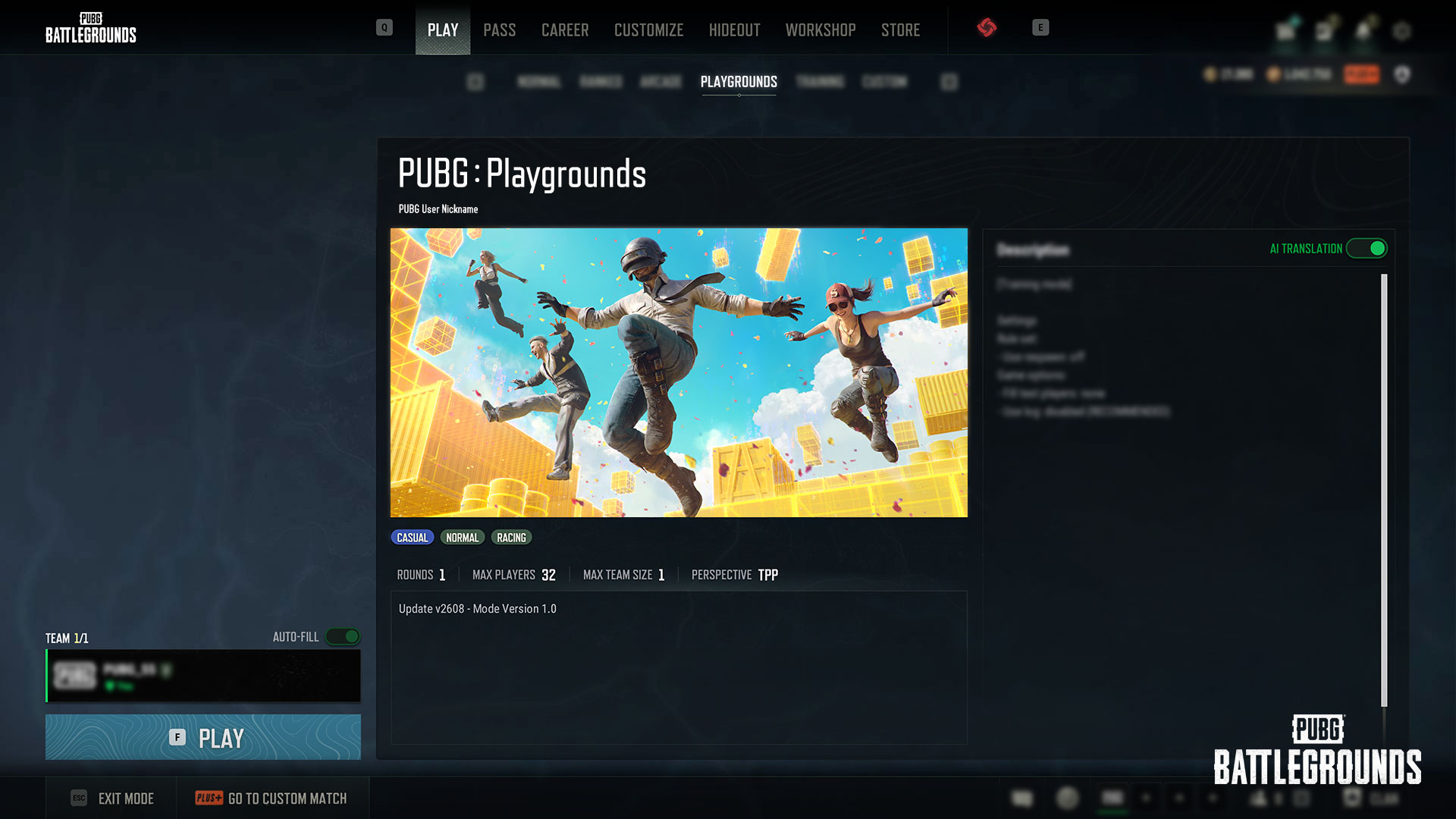
Mode Details Page
Selecting a mode will take you to its details page.
Mode Information
Main image / Mode name / Mode type (tag) / Creator information
Number of rounds / Maximum number of players / Maximum team size / Perspective
Mode update information (including version and update date)
You can view the detailed description provided by the creator and use the AI translation feature to read it in another language.
Matchmaking
After selecting a mode, you can begin matchmaking from its details page.
A matchmaking session will remain active for up to 1 hour and 30 minutes.
The session duration may be changed in the future.
When switching between a community-created mode and Normal or Ranked Mode, the party may be automatically disbanded if the number of party members exceeds the maximum player count supported by the mode you are switching to.
To start a match directly through Custom Match, select Go to Custom Match or Create. (A BATTLEGROUNDS PLUS account is required. The preset, map, and maximum player count cannot be changed.)
Tags
Tags have been introduced to make it easier to categorize, discover, and search for modes.
Primary tag: One required
Secondary tags: Zero to two may be selected (Primary tag-specific secondary tags / Shared secondary tags)
Primary Tag
Primary Tag-Specific Secondary Tags
Shared Secondary Tags
Battle (Team)
Team
1v1
2v2
3v3
4v4
NvN
Battle Royale
Deathmatch
Conquest
Puzzle
Racing
Party
Defense
Gun Game
Wave
Battle (Free-For-All)
Training
Completion time
Under 5 min
5-10 min
Over 10 min
Difficulty
Easy
Normal
Hard
Parkour
Casual
PvE
Additional Information
The modes available in PUBG: Playgrounds are player-created content and are not official PUBG content. Due to the nature of community-created content, unexpected bugs may occur during play. If a critical bug is identified, access to the affected mode may be restricted.
You must agree to the PUBG: BATTLEGROUNDS Mods Policy to use features such as Create to set up or join Custom Matches featuring player-created modes. However, matchmaking through PUBG: Playgrounds is available even if you have not agreed to the policy.
The PUBG: BATTLEGROUNDS Mods Policy can be found under the Mods Policy tab at the link below.